Alesis CompactKit 7 – Ultra-Portable 7-Pad Electronic Table-top Drum Kit with Velocity-Sensitive Drum Pads, 265 Drum Sounds, USB-MIDI Output, Battery- or AC-Power and Drum Sticks Included
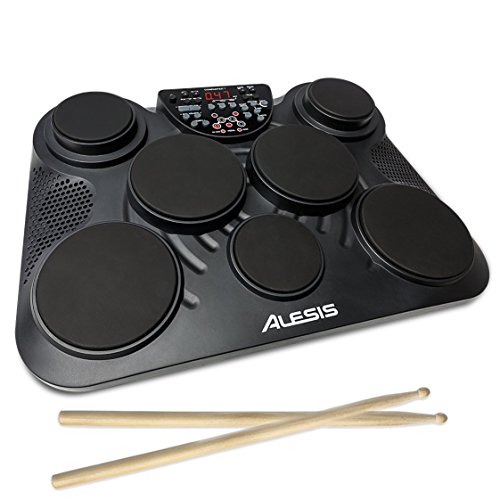
The Alesis CompactKit 7 is a versatile tabletop electronic drumset that's great for a novice to train on with enough control to charm a veteran drummer.
Seven velocity-sensitive drum pads with realistic feel and response deliver hundreds of percussion sounds to choose from. It also comes with two pedals for hi-hat and kick drum, so you have all the options of an acoustic set in a smaller, portable package. You can pick from more than a hundred built-in songs and adjust their tempo so you're able to comfortably play them as you train, with options for a metronome to guide you and visual feedback for each pad strike and footswitch.
Think you're ready to expand your sound potential? Use the USB-MIDI output to connect CompactKit 7 to your favorite digital audio workstations (DAWs) and plug-ins to use it as a MIDI controller.
Unlike traditional kits, this one is small enough to join you on your roadtrips and family vacations. Use a wall outlet or put in six C batteries to provide up to 14 hours of battery life.
The built-in speakers and headphone output jack mean you can quickly switch between public performance and private practice—whatever fits the circumstances best. Indulge your creativity at 2 a.m. without making the rest of your family—or the neighbors—hate you.
A pair of drumsticks complete the package, but if you ever lose them, you're still all right: switch to Hand Percussion and play bongo-style.
The CompactKit 7 has something for the drummer in everyone.
Frequently Asked Questions
Why did my CompactKit 7 turn off by itself?
The CompactKit 7 automatically shuts off if you attempt to turn the volume up too loud. This is a safety feature to prevent damage to the internal speakers. If your product continues to shut off by itself, try adjusting the volume to a lower level.
On the LED readout on the front of the product, I can only turn the volume up to ""11"". Shouldn't the volume go up to ""15""?
When the CompactKit 7 is plugged into a power source, the volume will go to ""15"". When the product is running off of battery power, the highest it will go is ""11"".
How do I change the MIDI notes my pads are sending via USB?
To set the MIDI note of a pad or footswitch:
- Press Note. A dot will appear in the display above Voice to indicate you are adjusting a voice setting
- Hit a pad or press a footswitch to select it
- Use the Value Down/Up buttons to adjust the note for the pad or footswitch
How do I record my performance with the CompactKit 7?
To record your performance:
- Select the desired kit, song, tempo, and reverb level (as described earlier). Also, if you want to activate or deactivate the drum part of the song, press Drum Off.
- Press Rec. Its light will flash.
- To start recording, hit a pad or press Start/Stop. The metronome will count off the tempo, but it will not be recorded. To deactivate the metronome, press Click.
- To stop recording, press Start/Stop.
Note:
- If the memory is full before you stop recording, FL will appear in the display, and it will stop recording automatically.
When you record a new performance, it will overwrite the previously recorded performance.
When you power CompactKit 7 off, the recording will remain in the memory.
How do I change the voice of a drum pad or footswitch?
To change the voice of a pad or footswitch:
- To change the voice of a pad or footswitch:
- Press Voice. A dot will appear in the display above Voice to indicate you are adjusting avoice setting.
- Hit a pad or press a footswitch to select it.
- Use the Value Down/Up buttons to select a voice (001–265) for the pad or footswitch.
To change the sound of another pad, repeat Steps 2–3.
How do I change the volume of a sound assigned to a pad or footswitch?
To set the volume of a pad or footswitch:
- Press Volume. A dot will appear in the display above Voice to indicate you are adjusting avoice setting.
- Hit a pad or press a footswitch to select it.
- Use the Value Down/Up buttons to set the volume (L00–L31) for the pad or footswitch.
To set the volume of another pad, repeat Steps 2–3
Technical Specs
Pads
- (7) velocity-sensitive pads with indication lights on control panel
- (2) footswitch inputs on rear panel
Sounds
- (265) drum and percussion sounds
Songs
- (80) looped songs
- (20) fixed-length songs
- (1) demo song
Connections
- (2) 1/4” inputs (for kick and hi-hat footswitches, included)
- (1) 1/4” stereo headphone output
- (1) 1/8” stereo auxiliary input
- (1) power input
Power
- 12V DC, 2 A, center-positive power adapter (included)
- (6) C batteries for 7 to 14 hours of use
Dimensions (width x depth x height)
- 7” x 14.6” x 6.2”
Weight
- 3 lbs
Box Contents
- CompactKit 7
- (2) Drum Sticks
- (2) Footswitch Pedals
- Power Adapter
- User Guide
Price: $169.00